
Friday, January 23, 2015
OTA: over 90% of data breaches in the first half of 2014 “could have been avoided”
Wednesday, June 15, 2011
PlayBook review: good for work, better for play | TechCentral

First the good: the BlackBerry PlayBook is infinitely more fun than expected. It’s sleek, it’s sexy, and it shamelessly aims to answer the complaints consumers have levelled at its — and every other tablet manufacturers’ — biggest rival, the iPad.
Its maker, Canada’s Research In Motion (RIM), has gone out of its way to make consumers aware of the fact that not only does the PlayBook support true multitasking, but that it also supports both Adobe Flash and Adobe Air Mobile. Of course, with HTML5, Flash could soon be consigned to the technological scrapheap anyway, but that’s not the point.
The point RIM wants to make is that the PlayBook does things that the iPad doesn’t. However, with only a 7-inch screen, the device immediately removes itself from contention for those consumers looking for a 10-inch tablet.
Aside from the power, volume up and down, and play/pause buttons on the top of the device, the PlayBook relies on a gesture-based touch interface. Swiping from the top bezel displays options when an application is maximised, or settings when viewing the home screen. Swiping up from the bottom in an app brings up the main menu and allows one to open multiple apps simultaneously, and swiping from the left or right bezel into the screen allows one to switch between maximised applications.
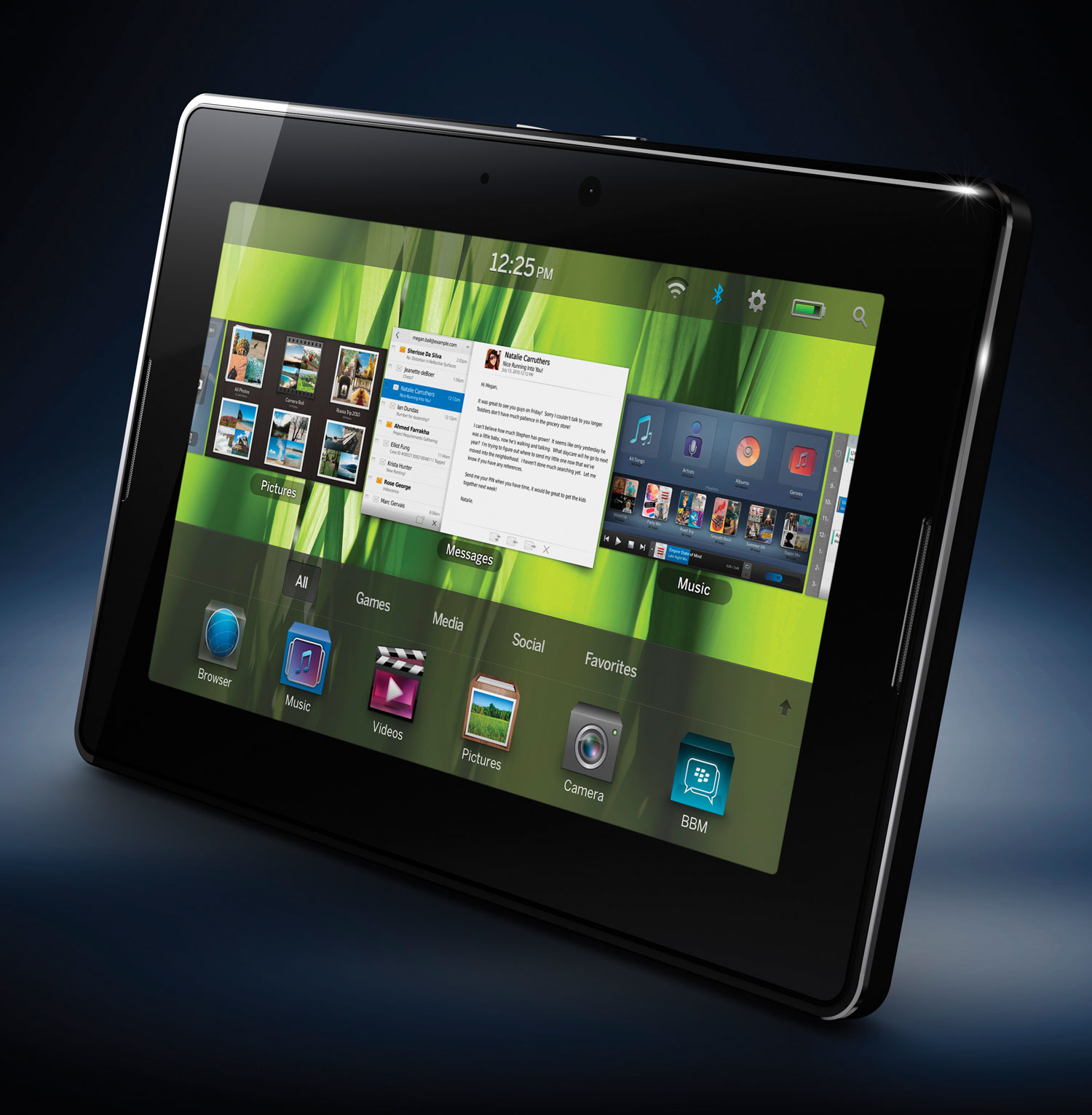
The screen itself is 1024×600 — fairly standard for a 7-inch tablet. The front-facing camera is 3-megapixels, while the rear is 5-megapixels – unfortunately, like many of its competitors, the rear camera doesn’t include any sort of flash.
As the name of RIM’s first foray into the tablet market demonstrates, RIM also want you to think of the PlayBook as anything but a business tool. It’s not that the company doesn’t want business sorts to use it; interest in the tablet from BlackBerry-enamoured business users is assumed. The goal, it seems, is to encourage non-BlackBerry users and retail consumers to consider it, too.
For those who claim their BlackBerry phone is a business tool (rather than just a tool for BlackBerry Messenger, or BBM) and hope to justify their purchase of a PlayBook using the same argument, here are the essentials: it’s compatible with BlackBerry Enterprise Server, it offers all manner of security options and, when it’s linked to a BlackBerry phone the PlayBook uses a secure Bluetooth connection.
The tablet connects to BlackBerry handsets by means of an application called BlackBerry Bridge. Bridge allows users to access and manipulate messages, contacts, BBM, memopad and tasks on their handset — but it shouldn’t be thought of as synchronisation. Once the Bridge connection is severed, no data remains on the PlayBook. This is one of the reasons it’s deemed so secure and suited to business users. It’s also one of the reasons non-BlackBerry users might feel reluctant to buy a product that seems so locked into RIM’s ecosystem.
Until later this year, the PlayBook will only be available in SA in its 16GB Wi-Fi configuration. Critics suggest that the lack of 3G support, the lack of a native e-mail client at launch, and the tablet’s “reliance” on a BlackBerry phone take it out of contention for non-BlackBerry owners in the market for a tablet.
However, for those with Wi-Fi access looking for a tablet with which to browse, check mail from an online service like Gmail, play videos and games, and check the weather, the PlayBook is a competent tablet, even without a corresponding BlackBerry handset.
The combination of a 1GHz dual-core processor, 1GB of RAM and the ability to switch between applications by swiping from the left or right bezel into the screen makes the PlayBook efficient at genuine multitasking. It’s even possible to play a high-definition video on a TV (via a mini-HDMI cable) while simultaneously checking e-mail or surfing the Web.
RIM highlights the PlayBook’s support for Adobe Flash (via YouTube):
Sure, there’s no native e-mail client at launch, but RIM have promised there will be one available shortly via a firmware update, and if you’re using an online e-mail client you won’t notice this early oversight. RIM isn’t the first company to launch an “incomplete” product, and it won’t be the last to. The Nintendo 3DS, for example, only got support for an Internet browser after launch.
The built-in Facebook and Twitter apps are competent, and their usefulness is bolstered by the PlayBook’s impressive multitasking functionality. However, a dearth of apps on offer in BlackBerry’s app store might put people off for now.
Neither the release date nor local pricing have been finalised, but RIM says prices will be “competitive”. Whether that means it’ll be in the range of the 16GB Wi-Fi-only iPad or its more expensive 3G-enabled sibling remains to be seen.
If the PlayBook is competitively priced, it could prove to be a compelling proposition for the casual user and a competitive option for business users who already use BlackBerry devices. However, for those looking for more than seven inches of screen real estate, or those with the patience to hold out for the next generation of Apple, HTC or Samsung tablets, the PlayBook’s superb multitasking abilities and intuitive interface may not be enough to convince the undecided.
— Craig Wilson, TechCentral
Monday, April 25, 2011
Real World Social Media – The Power of Networking
by Michael Hanson on his Uncommon Perceptions blog
I’ve spent the past 2 years and 9 months working diligently on an AACSB accredited MBA at the University of St. Thomas in Minneapolis, MN. The university requires successful completion of 17 classes, 2,200 hours of class time and a LOT of group projects of their MBA candidates – whether you attend full or part-time. My decision to attend St. Thomas was made for a variety of reasons (including their AACSB accreditation) but as I look back on the past 3 years or so – one criterion stands above the rest … the people.
The power of social media has enamored both marketing and sales organizations over the past few years. In fact, when I began my MBA coursework, Facebook was still a “college” thing rather than the behemoth it is today. Twitter was called Twttr. And the iPad didn’t exist.
Social media’s influence and impact continues to grow and to be debated but will surely be with us in the near term. However, we must not forget the power of being social in the real world.
The true power of social networking exists in real life as it has for generations. The ability to hold a conversation, to emote, to share and to laugh (without the use of LOL or emoticons) will quickly become a lost art form if we forget the most important aspect of our day-to-day the lives … the people we interact with, cherish, work with, or even dislike. No amount of Facebook likes or posts, Twitter Feeds, Apps, Texts, etc. can replace real world communication and networking. They can enhance or compliment the experience as any technological innovation should do.
While I’ve learned a great deal about marketing, statistics, decision-making, strategy, and yes, even social media during my pursuit of an MBA … as I reflect on my experiences it becomes readily apparent that no amount of technology or innovation replaces the fundamental power of being social – IRL.
(that’s Twitspeak or SMS for In Real Life)