Showing posts with label Tablets. Show all posts

Thursday, November 3, 2011

Samsung Galaxy Note in SA: pricing and details


Is it a tablet? Is it a phone? Actually, it’s a bit of both. Samsung Electronics has launched what it’s calling the first and largest 5,3-inch high-definition “Super Amoled” smartphone in SA. This is a beast of a phone. And it has a beastly price tag: expect to have to fork over at least eight and a half grand to own one (outside of a contract).

Samsung puts the recommended retail price at between R8 499 and R8 999 and is punting the phone, which has a 1280×800-pixel display and a stylus for note-taking and other tasks, as combining best of tablets and smartphones in a single device.

Despite its enormous screen, the Galaxy Note is a just 9,7mm thick and weighs only 178g, which is not much more than the popular Galaxy S II.

The display is reinforced with Gorilla Glass — a standard feature in high-end smartphones these days — and the Note comes preinstalled with Google’s Android 2.3 (Gingerbread) operating system. Samsung says an upgrade to Android 4.0, also known as Ice Cream Sandwich, will follow.
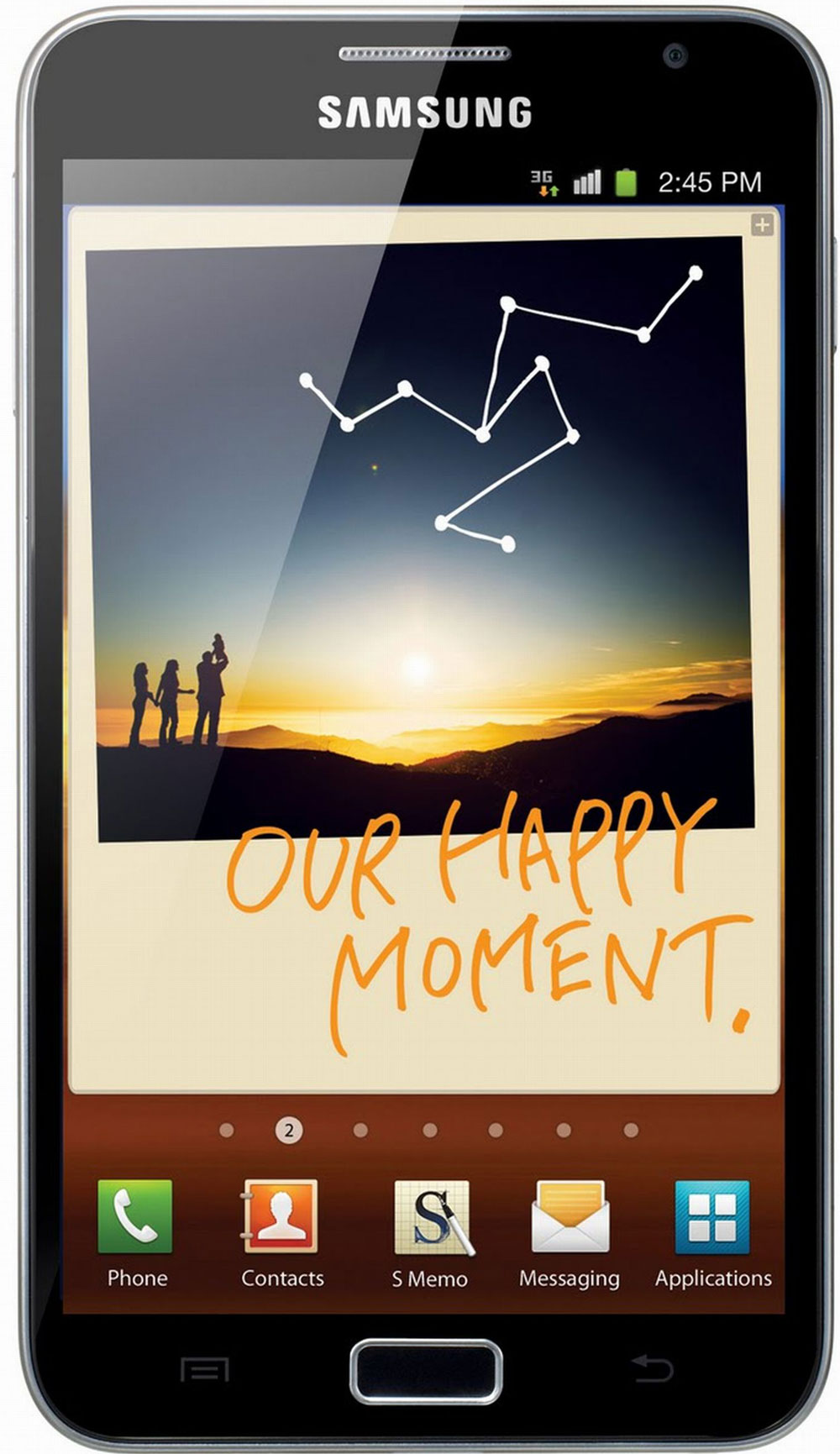
The Korean company hasn’t crimped on the hardware innards, either. It includes a dual-core 1,4GHz ARM Cortex-A9 processor and 1GB of RAM. It’s available in 16GB and 32GB models in international markets, though only the 16GB is available in SA at launch.There’s a microSD slot that supports up to a further 32GB of storage space.

The Galaxy Note includes an 8-megapixel camera, LED flash, autofocus, and shoots 1080p video at 30 frames a second. It also offers a 2-megapixel front-facing camera for video calling.
Connectivity is provided via Wi-Fi (up to 802.11n) and 21Mbit/s cellular downloads (5,7Mbit/s on the uplink). There’s DNLA support, too, for streaming content to and from compatible devices like PCs.

The stylus, which Samsung calls the “S Pen”, and which slots into the bottom of the device, allows users to annotate Web pages, documents and images and take screenshots, which can be shared via e-mail, MMS and social networks.

For business users, Samsung has included support for Microsoft Exchange ActiveSync, Cisco WebEx for video conferencing, and a wide range of virtual private networking support.

The Galaxy Note is being called a “phone tablet” by Samsung. It supports multi-touch input and includes new gestures like a “judo swipe” that involves swiping the side of your hand across the screen to take a screenshot.

Users can also take selective screenshots from websites by circling the elements on the page they want to save. These can then be further annotated and shared.

In conjunction with the Galaxy Note, Samsung has launched an instant-messaging service called ChatON, its equivalent of cross-platform message service Whatsapp and Apple’s iMessage. ChatON doesn’t come preinstalled on the Galaxy Note but can be downloaded from the Samsung app store.

The Galaxy Note will be available in SA in the second week in November. — Craig Wilson, TechCentral

Friday, October 28, 2011

How employees are driving an iPad revolution, and what IT’s doing about it

September 15, 2011
 
iPad and wireless keyboard on an office desk, with an office phone
Mirroring the adoption of smartphones and PDAs before it, the explosive growth of the iPad in business can be attributed almost entirely to employees’ obsession with Apple’s “magical” tablet.

The iPad’s transformation from consumer gadget to enterprise tool points the way to an employee-driven tech future in which users — not IT departments — get to choose their own gear and applications.

IT managers are learning how to adapt, fast.

“When the iPad was first released, we didn’t have any kind of enterprise strategy about supporting the device,” said Jeff Niblack, an IT manager at UnitedHealth Group, a diversified health and well-being company with over 80,000 employees worldwide.

“Within two weeks, we started getting our first inquiries. In the following two months, though, things really exploded, and I started getting requests for pulling iPads into nearly all aspects of the enterprise. There are now around 1,100 iPads deployed.”

Kaplan Higher Education agrees. The certificate and degree program company found itself bombarded with requests from employees who wanted to use their personal iPads on the job.

“Kaplan has a very young executive team and they were just in love with the iPad,” a Kaplan representative said. “They just started buying them, and so we had to learn to integrate the iPad as quickly as possible.”

Even the IT departments at smaller organizations are having problems with crowd control when it comes to denying iPads to their users.

Jeff Gargas is the IT Director for Robinson Engineering, a civil engineering firm with 120 employees spread across eight offices through the Chicago area. Robinson currently has a dozen iPads deployed, with more to follow.

At first, Gargas was nervous about giving iPads to his users.

“I’m a big fan of Apple products, so I was bringing my own iPad into work and using it for apps like Evernote, Dropbox and RemoteDesktop,” says Gargas. “Even so, one of the main reasons I was reluctant to deploy the iPad was because there’s no easy way to centrally manage the tablet, including mass-installing apps or connecting to files on our network.”

Eventually, Robinson Engineering realized it couldn’t keep employees from using their own iPads, and had to figure out how to make it work.

“As the iPad gained more traction and press, it became a lot more difficult to fend off people going, ‘Hey, why can’t we use iPads here?’” Gargas says. “Users started just purchasing their own and bringing them in, just like I did.”

“That was both a blessing and a nightmare: a blessing because we didn’t have to train users in how to user their iPads, a nightmare because we had no way to control them.”

The difficulty in centrally managing users’ devices is the biggest barrier to entry facing IT managers who want to deploy iPads to their users. For example, while Kaplan Higher Education eventually rolled out over 500 iPads to its users, it wasn’t easy, due to the company’s inability to distribute a device with a standard “image” of all the standard apps.

“That’s not the way Apple wants it done,” the Kaplan representative said. “They see the iPad as a personal device, each iPad as distinct as its owner.”

Problems that IT managers face in deploying iPads also include the mass purchasing of apps and the inability to add the iPad to corporate data plans.

Even so, Kaplan considers the rewards of deploying iPads to be greater than the drawbacks, and it is now considering giving iPads to as many as 10,000 students.

“Once the iPad’s actually out in a user’s hands, we love it. It’s easy to support. We don’t have to pay a company like Research in Motion licensing fees for a product like Blackberry Enterprise Server, since the iPad connects with Microsoft Exchange,” says Kaplan’s IT department.

Ultimately, IT managers seem to agree: Even though there are hurdles to deploying the iPad across an enterprise, the rewards are too great to ignore. But it does take a leap of faith.

What’s the lesson for businesses?

“Part of what we discovered here at Robinson Engineering was that letting our users figure out how to use their own iPads was the best part,” says Jeff Gargas. “If we hadn’t learned to trust our users and trust the iPad, I don’t think it would have been successful.”

As for Apple fans who want to use their iPads at work, the message is clear: The best way to get your company’s IT department to start supporting iPads is to bring yours to work and just start using it. Eventually, your company will have to catch up.

Photo credit: Nibaq/Flickr.com

Sunday, October 23, 2011

How the enterprise is adopting tablets (infographic)

October 21, 2011 | Sean Ludwig
ipad

It’s no secret enterprises have begun to adopt tablets with the same fervor of consumers. Since the debut of Apple’s iPad in Jan. 2010, the integration of tablet devices into our lives and work has progressed rapidly — so fast that it’s sometimes hard to put in perspective how quickly got here.

The exclusively obtained infographic below breaks down how far workforce adoption of tablet technology has come — and where it’s headed. (The graphic was sponsored by Lenovo and Qualcomm.)

In overall world market share for tablets, the iPad clobbers all others. The iPad accounted for nearly 80 percent of worldwide tablet sales during the past 12 months, but Android is slowly gaining ground, thanks to a wide variety of devices and prices. On the higher end, there are devices like the Samsung Galaxy Tab 10.1 and 8.9, and on the lower end there’s the upcoming Amazon Kindle Fire and already well-established Nook Color.

Enterprise adoption is quite different from total adoption. A just-released survey from Good suggests the iPad and iPad 2 were responsible for 96 percent of tablet activations in the enterprise in the third quarter of 2011. With just 4 percent of activations being Android-based, Apple has a clear lead with the enterprise crowd.

Business users have different needs with their tablets, chief among them are strong and versatile applications that keep the mobile workforce connected. The iPad has a clear lead in this area with more than 136,000 iPad-optimized apps while Google won’t reveal how many apps are actually optimized for Honeycomb-based tablets. (Some estimates guess it is under 1,000 at present.) One of the most promising enterprise applications we’ve seen recently is Polycom’s video-conferencing app that works for both iPad and Android tablets.

It’s unclear at this point if Android will be able to take away much of the share the iPad has secured with enterprise users, especially in Bring-Your-Own-Device workplaces. But we’ll be watching to see what happens in this exciting space and let you know the latest.

Tablet_Adoption_infographic

Wednesday, October 19, 2011

The ‘iDevice’ nightmare facing corporate IT shops

Employees want devices like Apple's iPad to work with their company's IT systems

Employees bringing their own gadgets, from smartphones to tablet computers, into the companies they work for and expecting them to function seamlessly with corporate technology systems is proving to be a significant and growing challenge for IT departments.

Warren Johnson, account technology specialist at Microsoft, says IT departments are struggling to
figure out how to accommodate the growing range of devices and online ecosystems that employees expect will interoperate with company-managed systems. In many cases it’s creating a security headache for IT directors, he says.

It’s becoming a tricky balancing act for many companies as they try to figure out how to benefit from this “consumerisation of IT”, while at the same time ensuring their systems aren’t compromised and the IT department doesn’t become overloaded because it’s supporting a multitude of nonsanctioned devices and ecosystems.

Employees are also expecting more from IT because they come across business systems online and want the technology function in their organisations to replicate it.

“We don’t see this trend stopping,” Johnson says. “IT has to catch up with what consumers are demanding.”

The question, he says, is whether they can. Though some companies are “really trying” to adopt and adapt to consumer technologies, it can become a “nightmare” to manage all the devices. “Internal developers are asking how they keep up with all the different technologies out there.”

The challenge for many IT departments is it’s often the CEO that is demanding his iPad or other new-fangled device interoperates seamlessly with the corporate backend systems, meaning they don’t have the choice of simply barring their use.

“The executives want the funky stuff. Four years ago they were saying you have to secure and manage everything because it’s too costly for us. Now they’re saying bypass it for me because I want my funky laptop.”

Johnson says embracing IT consumerisation has many benefits — and some employees may shun the idea of working for a company that doesn’t allow them to use their own gadgets for business purposes — but there are also big risks. “What if there is a zero-day attack on a platform you’re not in control of?”

Part of the solution, he says, is for companies like Microsoft to make it easier to develop applications that run across platforms. In Windows 8, the upcoming release of Microsoft’s dominant desktop operating system, developers will be able to write apps in Web-based programming languages and port these to other platforms.

“But it’s hard,” Johnson says. “We get organisations saying that if they allow users to bring in any device, then what sort of apps do they permit? If I can’t secure that device, how do I control which devices can have which apps with which data?”

Of course, not all organisations can allow consumer IT products and services. Johnson says Scotland Yard, by way of example, controls what devices are able to access its systems very tightly to prevent sensitive information from leaking. The organisation is strict about what devices, applications and data its employees may use.

But for many companies, embracing the trend has bigger benefits than trying to fight it, Johnson says.
Ultimately, he says, end-user devices will catch up with standards and allow IT departments to manage them better. “Manufacturers will come up with devices that support data encryption and they’ll be more on par with each other in terms of security and manageability.”

Until then, companies have a very real challenge on their hands: embrace the benefits and assume the risks, or try to move against the trend and face a revolt from users.
Duncan McLeod, TechCentral

Tuesday, September 27, 2011

Cisco’s Cius tablet is all business | TechCentral

— Craig Wilson, TechCentral

With all its rivals focusing their tablet computing offerings squarely at consumers, networking giant Cisco is taking a bet that its tablet offering, the Cius, will appeal to the corporate set. The product, which is now on sale in SA, is only available to business customers.

The seven-inch Android-based tablet has a 1,6GHz Intel Atom processor, a back-lit, multi-touch LCD screen with a resolution of 1024×600 pixels, 32GB of storage, front and rear cameras both capable of 720p video (and offering support for all Cisco TelePresence videoconferencing) and weighs just 535g.

At launch, there is only a Wi-Fi model available, but mobile broadband models will follow soon. The Cius includes a microSD slot for expanding the on-board memory. This can also be secured so the card can’t be read when used in a device other than the Cius.

Despite its capable hardware, the Cius runs the somewhat outdated Android 2.2. The company says this is because of the need for high security specifications and that there will be support for Android 3.1 in future.

Regarding the decision to go for a 7-inch screen, Cisco engineer Leon Wright says the company decided seven inches was the ideal combination of functionality and portability.

Considering its target market, it’s not surprising the Cius offers virtual desktop integration, a unified communications porfolio, cloud centralisation of device management, and high-definition videoconferencing support, all of which is complemented by its “contacts-driven” user interface. The Cius also ships with QuickOffice preinstalled for viewing and editing all major document formats.

It offers operating system and file system-level encryption, password management, the ability to push and enforce policies remotely, the large-scale provision of services across multiple devices and the ability to remote lock or wipe the device – or a batch of them – on demand.

The Cius connects to a company’s existing telecommunications network via an optional docking station, which supports fixed-line telephony, includes a full duplex speaker for hands-free use, two USB ports for a keyboard and mouse, an HDMI-out port for extending video capabilities to an external display, and a power-over-Ethernet port for networking and charging.

Another feature of the Cius that has yet to make its way to consumer tablets is the detachable battery that offers an anticipated eight-hour battery life and can be swapped out with a spare if necessary.

Cisco has also created an application store that it calls App HQ, which is complementary to the Android Market. Apps HQ hosts applications specifically designed for the Cius and tested by Cisco.

It is also possible for system administrators to limit which apps users can install, and can do this per user or per group of users – for example, the sales team can all be granted access to the same apps.

System administrators can even create a custom marketplace with handpicked apps for their particular business.

Sunday, September 25, 2011

Techcentral // Acer’s Iconia A500 Tab: an exercise in optimism

Just about every computer and phone manufacturer now makes tablets in the hope of grabbing some of the scraps of market share Apple doesn’t hold with the iPad. Acer has a couple of tablet offerings, but its headline act is the Iconia Tab A500, a 10,1-inch Android-powered monster with innards that compare well to rival offerings.

Some of the A500’s vital statistics include a 10,1-inch capacitive LCD touch screen with a resolution of 1280×800 that supports multi-touch gestures with up to ten fingers, a light sensor for auto-brightness adjustments, and a 2-megapixel front-facing camera for video calling or checking for spinach in your teeth.

Behind its not-unattractive visage — albeit one more prone to fingerprints than its competitors and less than great in sunlight — is a dual-core 1GHz Tegra processor and 1GB of RAM, meaning lag is no problem even when running a range of applications simultaneously. There are all the usual bells and whistles we’ve come to expect from tablets, like a microphone, surprisingly good speaker, accelerometer, GPS, multi-tab browsing and Bluetooth, but it’s the unexpected additions that are the A500’s strongest selling point.

Though the mini-HDMI port isn’t unheard of and neither is the microUSB port — which unfortunately is only for data transfer, not charging, purposes — Acer has included a full-sized USB 2.0 port, making it a far more flexible device than any of its competitors’ products.

Not only can you plug in an external hard drive, but card readers and other USB devices suddenly become tablet friendly. Naturally, there are limitations to what will work with the A500, but it is nevertheless a great differentiating feature. Another of these differentiators is the LED flash that accompanies the rear-facing, 5-megapixel camera, which also includes autofocus and the ability to shoot video at 720p at 29 frames per second. There’s also a microSD slot that allows for expansion of the default 16GB or 32GB of onboard storage. The A500 is Wi-Fi only, while the A501 offers support for 3G. The A500 appears to include a crippled Sim slot under the same flap as the microSD slot, but it’s covered with a sticker that reads:
“Warranty void if seal is broken.”

At R5 399 for the 32GB version, the A500 costs as much as the equivalent Wi-Fi-only iPad 2. However, it weighs slightly more than the Apple device and, despite the price, the A500’s build quality doesn’t feel as good as those of Samsung’s or Motorola’s tablets, let alone the iPad.

The seam running around the edge of the device is unsettling, and prompts visions of the device winding up in two parts if dropped accidentally. Also, although the rest of the buttons feel decent enough, the orientation lock/unlock button and volume rocker feel flimsy and cheap.

Then there’s the proprietary charger, something common to most tablets, but annoying nevertheless and a reminder of the days of proprietary cellphone chargers. The charger also seems bulkier than it should, and rather than incorporating a data cable with a power adaptor the A500 requires carrying both.

There are two big failings with the Iconia A500. The first is its size. Not only is it quite thick at 13,5mm, but tipping the scales at 730g it weighs more than the first-generation iPad and about the same as the Motorola Xoom.

There’s one another failing: poor battery life. Plugged in and fully charged on day one, with Wi-Fi left on and less than 30 minutes of use, the A500 was almost dead the by the morning of day two. Having charged it again, by the end of day two and having played around with it intermittently for no more than two hours and having had it on standby for another eight, the battery charge had fallen to 27%.

The Iconia A500 runs Android 3.1

The A500 gets around six hours of use to a charge, which is relatively poor next to the competition. What’s more troubling is the standby time. Perhaps Acer needs to refine how its tablets behave when they’re on, but idle.

In its defence, the A500 offers excellent functionality, a respectable display with superb viewing angles, a plain-and-simple Android interface atop Android 3.1, some great features other tablets don’t offer, and it has a respectable design.

However, the price, in conjunction with the build quality, brings to mind a (somewhat paraphrased) line from the cult Australian film The Castle: “Tell ‘em they’re dreamin’”.

— Craig Wilson, TechCentral

Friday, September 2, 2011

Gadget Web Site - The eee Pad has landed

The eee Pad has landed
The WiFI version of the Asus eee Pad Transformer sneaked into South African stores in July with little fanfare. But the high-end 3G unit arrives this month, and Asus expects it to shake up the market. ARTHUR GOLDSTUCK assesses its chances.

Four years ago, Asus was one of the earliest and most aggressive players in the Netbook market with its Eee PC. It practically invented the format.

So, when Apple redefined portability with the iPad in 2010, Asus was expected to be one of the first challengers. And, indeed, it hit the market mere weeks after the iPad, confusingly announcing an e-reader it called a Tablet, and a tablet it called a Pad. The fact that Apple didn’t immediately take them to court may well have been an indication that these devices posed little challenge to the iPad at the time. Fast-forward a year, and Asus has a device on the market that goes beyond the iPad.


It’s called the eee Pad Transformer, a 10.1” tablet running Android 3.0 or Honeycomb, and offers an optional docking keyboard that also boosts battery life from 9 hours to 16 hours. Well-priced at $399, its first production runs – estimated at about 100,000 – reportedly sold out immediately in some markets, and in June it shipped a further 300,000 units.

That it remained in short supply is an indication that, with more aggressive and courageous marketing, it could join the Samsung Galaxy Tab 10.1 as the main challenger to the iPad.

The first version of the eee Pad (pronounced “e-pad”) was WiFi only, and that’s the version that arrived quietly in South Africa in early July. September sees the 3G version arrive in South Africa, around mid-month.

“We have some significant retail developments to be announced in September which will boost our unit sales,” says Tyrone Grüner, Asus product manager at Platinum Micro.

He points out that the Asus eee Pad Transformer has quickly become the number one-selling “open” tablet in a number of international markets. Its success, he says, is a design which delivers against the demands of a market spoilt for choice.

“While a number of Android tablets are emerging, the eee Pad is winning market share owing to its battery life, performance and design. It is on these criteria that it is unbeatable,” he says.

Asus also makes much of the fact that, in July, it was reported that Asus has assumed the mantle of the world’s biggest non-iPad tablet maker.

“This is significant,” says Grüner, “as there is no shortage of competition in this segment of the market. With over 400 000 units shipped, and with the Asus device listed as the number one selling tablet on Amazon.com in April this year, consumer demand is strong.”

It’s not the tablet alone that is selling, he adds.

“What is particularly noteworthy is that the bundle including the keyboard is the top-selling configuration. This tells us that tablet users want more than touchscreen input from their device. That’s especially true as the tablet is seen not as a ‘play’ device, but one which is at home in the office or after-hours.”


In the light of criticism that Sony’s newly unveiled Tablet P is “plasticky”, it is also significant that the eee Pad uses high-quality materials that include brushed aluminum. It takes on the iPad with dual front and rear cameras, the Galaxy Tab with an SD and MicroSD card slot, and delivers on the now standard tablet expectations of embedded GPS, Bluetooth and WiFi connectivity.

Since it uses the Google Android operating system, says Grüner, “it represents an ecosystem which is delivering hundreds of thousands of apps to the user. Easy interoperability with compatible mobile phones is assured, which, when tethered, create a WiFi hotspot. With support for Flash and supplied with the Polaris Office suite, the versatility of the device is clear.”

At $399 in the USA, the eee Pad is the most affordable Android Honeycomb tablet on the market. However, this price advantage is not carried over to South Africa. The official prices announced in June start at R4499 for the 16GB version, which at first site appears to compare directly with the iPad 2’s R4 399 for its own 16GB version.

But comparing Apples with Asuses, this is plain poor strategy. The comparable US prices being $399 and $499 for the Pad and iPad respectively, the South African cost for the eee Pad should be around R3600. That would make it far and away the cheapest major name brand large format tablet in South Africa (with only Huawei’s 7” Slim at the same price point), and give it an unbeatable advantage in this market.

Perhaps we will see more competitive pricing when the 3G version arrives in bulk. Meanwhile, the reseller channel – Hirsch’s, Look & Listen, Computer Mania and Chaos are lined up to stock the device – should expect customers to demand that it be better than the iPad if they are expected to pay the same price.

Grüner is confident the customer will make the right choice: “Consumer demand is there; it’s hard to describe the appeal of this product without seeing it for yourself, so we believe that as word of mouth gains momentum, there will be plenty of people who are looking for the advantages of great hardware design combined with Android’s appeal who will choose the Asus tablet above any other. We’ve seen it internationally; we’ll see it in South Africa, too.”

* Pricing for the Asus eee Pad Transformer is estimated at R4499 (16GB), R5499 (32GB) and R6499 (32GB dock bundle). Final pricing is reseller-determined. For more, including specifications and demonstrations, view: http://www.asus.com/Eee/Eee_Pad/Eee_Pad_Transformer_TF101. For more information on Platinum Micro, visit www.platinummicro.co.za

* Follow Arthur on Twitter on @art2gee

Thursday, August 18, 2011

Motorola Xoom review: fit but fat tablet | TechCentral

Craig Wilson, TechCentral

Motorola’s Xoom has (finally) gone on sale in SA. Though it was originally regarded as the ultimate Android response to Apple’s iPad, much has changed since it was first released in international markets in February. TechCentral’s Craig Wilson spent some time with the Xoom to see how well it stacks up against the competition.

The Xoom — which has a recommended retail price of R6 599 — comes preinstalled with Android 3.0 (Honeycomb) from Google, but this can be updated to 3.1 immediately. The update is necessary to enable the SD card slot, which allows expansion the Xoom’s 32GB of internal flash memory by up to another 32GB.
Though the Samsung Galaxy Tab 10.1 is today regarded as the iPad’s greatest rival, the Xoom was lauded highly when it came out. It won the coveted award for best tablet at CES in January. However, SA consumers won’t be comparing the tablet to what was available at the start of the year, they’ll be matching it up against what’s on sale now. And, despite the Xoom’s impressive specifications, it has a couple of glaring problems when compared to its nearest rivals.

The main problems are that the Xoom is heavy and relatively thick. At 730g, it weighs the same as the first generation Wi-Fi-and-3G iPad, but that makes it 120g heavier than either the iPad 2 or the Galaxy Tab 10.1.

Also, like the first iPad, it’s considerably thicker than either the iPad 2 or Galaxy Tab 10.1. The result is a tablet that feels bulky and heavy, and one that demands to be handled with two hands at all times. These aren’t minor problems.

The Xoom could be considered a great device when it came out, but six months is an aeon in technology terms.

Let’s look at its specifications. It’s powered by Nvidia’s Tegra 2, 1GHz dual-core processor and has 1GB of DDR2 RAM. It supports just about every major video and audio file format, includes a GPS, an electronic compass and even a barometer (for the weather geeks).

There’s also a dual LED flash with a 5-megapixel rear-facing camera, a 2-megapixel front-facing camera — better than the VGA offering on the iPad 2 — and it’s possible to connect the Xoom to any HDMI compatible screen (cable not included).

The Xoom’s screen deserves special mention. At 10,1 inches and with a resolution of 1280×800, it’s bright, crisp and capable of HD video playback — and is responsive to the touch. It’s clear that in the specifications department the Xoom holds its head high, even if it is the chubby kid out of the current pack of tablets on the market.

But what’s it like to actually use? We have a couple of criticisms of the Xoom in this department. The decision to put the power/unlock button on the rear is strange, and one that takes some getting used to.
Then there’s the user interface (UI) itself. Strangely, the Xoom only allows widgets and shortcuts to be placed a minimum of an inch away from the left and right sides of the screen when in landscape orientation — no doubt to allow it to squash everything in when in portrait mode. It’s also pretty restrictive in terms of how
close together you can place widgets.

But given the camera is centred above the screen in landscape mode, and the placement of the power/unlock button also suggests landscape is intended as the default orientation, there was surely a better solution than forcing users to sacrifice an inch of screen real estate on each side, on each home screen.

Motorola has opted to put the notification bar, which includes a digital clock, connectivity and battery indicators as well as the back, home and switch application buttons along the bottom of the Xoom’s display. It works well enough, but in order to access things like Wi-Fi settings users have to tap the connectivity icon, then a settings icon, and then Wi-Fi.

We didn’t like the Xoom’s unadorned and overlay-free Honeycomb UI out of the box, but we love the possibilities the processing power and screen afford the intrepid Android fan who isn’t afraid of doing a little bit of interface tweaking.

However, no amount of fiddling is going to make the Xoom weigh any less. And that’s really the problem: the Xoom was great in its day, but it doesn’t stack up anymore, especially not next to the only slightly pricier Galaxy Tab 10.1.

Wednesday, August 3, 2011

Apple vs Android vs Blackberry: Smartphone and tablet PC trends in SA « Gadgets « MyBroadband Tech and IT News

August 3, 2011

BMI-T recently revealed the results of their study in smartphone and tablet PC trends in SA

BMI-T recently conducted an online survey on MyBroadband.co.za in order to gauge tablet PC and smartphone trends among South African early adopters.

Ryan Smit, digital consumer unit head at BMI-T, explained that MyBroadband’s demographic includes highly technologically minded people which represent the early adopters of technology rather than the main stream mass market.

The survey had 1,500 respondents, BMI-T said, adding that the trends among early adopters are not necessarily indicative of what will happen in the mass market.

Ryan Smit, digital consumer unit head at BMI-T, described early adopters as the “tip of the wave” and explained that their perceptions are fairly fickle.

How likely are you to get a tablet PC?

BMI-T asked respondents how many already have tablet PCs, and whether they are looking at getting tablet PCs in the next few months.

Among the respondents, 13.1% said they have tablet PC now, with 24.1% saying they plan to get a tablet in 3 months, 36.3% in 6 months, 53.6% in 12 months, and 71.6% in 24 months.

Smartphone vendors rated

Respondents were also asked how highly they rate smartphone vendors. Unsurprisingly, Apple came out on top. The ranking was as follows:
  1. Apple – 65.4%
  2. HTC – 55.7%
  3. BlackBerry – 44.3%
  4. Samsung – 41.3%
  5. Nokia – 26.5%
  6. Motorola – 10.4%
  7. LG – 5.2%

Service provider smartphone offerings

The smartphone offerings of South Africa’s service providers were also rated. Vodacom received the highest rating at 54.8%, followed by MTN at 48.4%. The ratings then take a sharp drop with Cell C at 23.3%, Nashua Mobile at 19.4%, Autopage at 14.8%, and other service providers steadily getting lower ratings thereafter.

Smit said that 8ta wasn’t included in the survey as the new operator wasn’t around when they developed the survey.

Past, present, future handset choices

BMI-T also asked the respondents which handset they used previously, which they use currently, and which they plan to use in the future.

Here their findings correlate with those which World Wide Worx released earlier this year (2011), with Nokia’s market share amongst early adopters declining and BlackBerry, Apple, and Android manufacturers’ market share increasing.

Manufacturer Previous Current Future
Nokia 40.70% 23.40% 6.90%
Samsung 14.80% 11.80% 16.20%
Motorola 3.50% 1.50% 1.60%
Sony 14.80% 5.80% 2.90%
HTC 10.50% 15.10% 17.50%
BlackBerry 6% 23.60% 20.20%
Apple 6.30% 16.20% 30.80%
LG 1.90% 1.30% 1.00%
Other 1.40% 1.30% 2.80%

Interestingly, the current sentiment among early adopters seems to indicate a slight decline in the favour BlackBerry has enjoyed in South Africa, while the aspiration to Apple’s iPhone is quite high among the respondents.

Friday, July 29, 2011

Samsung's Galaxy Tab 10.1 mobile tablet hits SA - Business LIVE

Digital media and digital convergence technologies group Samsung Electronics on Friday announced the retail availability of the Galaxy Tab 10.1, the world's thinnest mobile tablet, in SA from August 1.

The Galaxy Tab 10.1, which includes 32GB of built-in storage, will retail for 7,499 rand.

Powered by Android 3.1, Honeycomb, the Galaxy Tab 10.1 offers faster and smoother transitions between different applications, more intuitive navigation to and from home screens and broader support of USB accessories.

The device measures a slim 8.6 millimetres and also boasts a weight of 595g, for enhanced mobility and portability.

The device includes a 10.1-inch touchscreen display with WXGA 1280x800 resolution.

"The Galaxy Tab 10.1 is a remarkable example of Samsung's constant innovation, demonstrating our dedication to designing products of the highest standard, ensuring they fit the unique needs of technology-savvy people wanting to lead a smarter life," said George Ferreira, chief operating officer for Samsung Electronics Africa. "We have combined our innovations in design and display with an intuitive user experience, creating a new class of products that will lead the tablet market."

Thursday, July 28, 2011

Don’t get a new smartphone now « Columns « MyBroadband Tech and IT News

There are very good reasons to wait, says Moneyweb’s Hilton Tarrant

The device makers won’t like you reading this. In fact, the operators won’t either.

Don’t buy or upgrade to a new smartphone now. It’s similar to the deflationary curse: Why make a purchase decision now when you can make it tomorrow? After all, goods will be cheaper then. And, in the case of smartphones (and all technology), they will almost certainly be cheaper – unless the rand takes a dive.

But, there’s a very, very good reason to wait when it comes to getting a smartphone. Most of the major handset manufacturers are about to announce important new models, or are busy transitioning to a new platform altogether.

But why should you care about the operating system (OS) on your smartphone? One word: apps. If you’re running an old OS, chances are there won’t be any new applications being developed for it. Also, older versions of platforms are clunky and turn normal tasks like e-mail and web browsing into a poor experience.

“Upgradability” is another factor to consider when it comes to picking a phone (and platform). Will you be able to upgrade to a newer version of iOS/Android/Bada/Symbian/Windows Phone? If you can’t upgrade, you’re stuck on that OS until your next upgrade in two years time – and a lot changes in two years.

Both BlackBerry and Nokia have been (unfairly) pummelled by the investment and analyst community over recent months. Each has its own unique challenges, largely the result of strategic missteps or inaction in the past. And each is transitioning to a new platform/operating system.

Nokia’s move to Windows Phone 7 (WP7) has been well-publicised and we will see the first new model running Microsoft’s (quality) operating system before the end of the year. A video of its flagship device, the N9, running WP7 has already been leaked. (The N9 runs the aborted MeeGo operating system.) And it looks impressive.

There’s nothing wrong with Windows Phone 7. In fact, for the first time, there’s a viable challenger to the current Apple iOS and Google Android hegemony. That does not mean there aren’t great devices available. The Nokia E6, a hybrid qwerty/touchscreen phone, is a fantastic device – don’t get me wrong. Great build quality and an improved OS, but standing in the shadow of a WP7 future. Nokia should’ve arguably shipped the E6 a year ago.

BlackBerry’s transition is different. It’s rewriting its OS from the ground up, basing it on the QNX operating system that the Playbook is built on. This is a major leap forward and if they get it to market quickly, using a BlackBerry will finally be comparable to the smartphone leaders of today. Try using a BlackBerry browser and then use an Android device or iPhone. See what I mean?

The problem is that BlackBerry’s current models are stuck between a very dated platform (the one on your kid’s BlackBerry), and the future. So the current devices available are either running OS 5, OS 6 (a big improvement), with the promise of OS7 on the horizon (it’s more “6.5” than “7”, but anyway). The BlackBerry Bold 9780 is a solid phone – it runs the new “OS 6” which is a leap ahead of the older platform. But the Bold 9900 with OS 7 and hybrid qwerty/touchscreen will be available in months. And there’s the prospect of yet-to-be-announced devices on that new platform…

We should see Apple updating its iPhone before the holiday season. This could be a minor improvement, or a completely new device. At least you don’t have to be too concerned with upgrades – the new iOS 5 will be available in a month or two’s time.

Samsung and HTC continue innovating with an avalanche of new models being released throughout every year. The Samsung Galaxy SII and HTC Sensation are their respective flagship smartphones at the moment, but expect this to change before Christmas.

LG, Sony Ericsson and Motorola have largely faded into the background. Motorola’s MB525 (the water and scratch resistant “Defy”) is a great handset, and Sony Ericsson’s Xperia range has great devices. LG’s Optimus Black is also a solid smartphone, but all three of these give a feeling of simply “ticking the boxes” – there’s very little differentiation on the Android platform.

There are a few options. Buy any of these smartphones with the full knowledge that 12 months down the line they’re going to be very “dated”. Or buy something that’s easily upgradeable like the iPhone 4 – but know that it too will be “old” next year.

Alternatively stall on your upgrade altogether, or stall for now and buy an entry-level smartphone cash for under R1 000 like the Vodafone 858 Smart, or one of the lower-spec BlackBerry devices. This will give you the apps (at least some of them), services and experience you’ll be looking for from a smartphone until you can make a decision later this year with new devices and platforms on the market.

*Hilton Tarrant contributes to “Broadband”, a column on Moneyweb covering the ICT sector in South Africa. He’s perfectly happy carrying both a BlackBerry Bold and Apple iPhone…

Tuesday, July 19, 2011

10-inch Tablet pricing comparison – July 2011 « Gadgets « MyBroadband Tech and IT News


July 19, 2011
3 comments


Android and iOS 10-inch tablet showdown between Apple, Samsung, Acer, and Asus

With the latest entrant to the South African tablet PC market, the Asus Eee Pad Transformer (TF101), available for some weeks already, it’s interesting to take stock of the local tablet PC space to see how the various players compare.

Apple long dominated the world of tablet PCs with its iPad, but Google has released a version of its Android mobile operating system (OS) optimised for tablet PCs which has led to a number of devices vying for Apple’s crown.

The first Android 3.0 “Honeycomb” tablet was the Motorola Xoom which received mixed reviews and is yet to be launched in South Africa.

Vodacom has listed the device in its latest deal booklet as “coming August 2011,” but its pricing has yet to be confirmed. It remains to be seen how well the Xoom will be able to compete against the newer Android tablets which have already hit South Africa.

The first table shown below pits Android and iOS (Apple’s mobile OS) tablet models with 16GB of internal storage against one another.

16GB 10-inch Tablet Pricing Comparison
Tablet ASUS Eee Pad Transformer iPad 2 Wi-Fi iPad 2 Wi-Fi + 3G Samsung Galaxy Tab 10.1v
Platform Android 3.0 Honeycomb iOS 4.3 iOS 4.3 Android 3.0 Honeycomb
Display 10.1″ 9.7” 9.7” 10.1”
Resolution 1280×800 1024 x 768 1024 x 768 1280 x 800
Storage – Internal 16GB 16GB 16GB 16GB
Storage – External microSD (32GB) None None None
Processor 1GHz Nvidia Tegra 2 1GHz A5 1GHz A5 1GHz Nvidia Tegra 2
RAM 1GB 512MB 512MB 1GB
Connectivity Wi-Fi only Wi-Fi only Wi-Fi + 3G Wi-Fi + 3G
Camera 5MP rear, 1.3MP front 0.7MP rear, 0.3MP front 0.7MP rear, 0.3MP front 8MP rear, 2MP front
Price R4,299 R4,399 R5,599 R8,249

Although the Samsung Galaxy Tab 10.1v doesn’t look competitive with its high price, the Vodacom franchise that provided the last price they had for the device explained that it was a month old.

According to them, the 10.1v is no longer available as Vodacom is expecting its successor (or successors) “soon.” This is the Samsung Galaxy Tab 10.1, and possibly its smaller brother, the 8.9.

The next table compares the 32GB models of various tablets.

The Samsung Galaxy Tab 10.1v isn’t listed, as according to Vodacom only its 16GB version was officially available. Although the Acer Iconia A500 also has a 16GB model, the 32GB model advertised at Incredible Connection was cheaper than the 16GB versions we found scattered around the ‘Net.

32GB 10-inch Tablet Pricing Comparison
Tablet ASUS Eee Pad Transformer iPad 2 Wi-Fi Acer Iconia A500 iPad 2 Wi-Fi + 3G
Platform Android 3.0 Honeycomb iOS 4.3 Android 3.0 Honeycomb iOS 4.3
Display 10.1″ 9.7” 10.1” 9.7”
Resolution 1280×800 1024 x 768 1280 x 800 1024 x 768
Storage – internal 32GB 32GB 32GB 32GB
Storage – external microSD None microSD, USB None
Processor 1GHz Nvidia Tegra 2 1GHz A5 1 GHz Nvidia Tegra 2 1GHz A5
RAM 1GB 512MB 1GB 512MB
Connectivity Wi-Fi only Wi-Fi only Wi-Fi only Wi-Fi + 3G
Camera 5MP rear, 1.3MP front 0.7MP rear, 0.3MP front 5MP rear, 2MP front 0.7MP rear, 0.3MP front
Price R5,199 R5,399 R5,999 R6,599

It is encouraging to see the Asus taking on the iPad in terms of pricing.

While the iPad 2 seems to be the poorer device on the spec sheet when compared to the Transformer and Iconia, one mustn’t forget the advantage the device offers when it comes to applications.

Monday, May 16, 2011

Gadget Web Site - Tablets, take two

16 May 2011 by Arthur Goldstuck | Filed in Goldstuck on Gadgets Tablets, take two

The Africa launch of the new Samsung Galaxy tablet range and the South African unveiling of the RIM PlayBook, weeks after the arrival of the Apple iPad 2, finally brings the tablet wars out in the open. ARTHUR GOLDSTUCK discovers a serious iPad rival.

The tablet computer invasion this column has been heralding for most of the year has finally broken through the defensive lines that protect South African consumers from the threat of owning the world’s most up-to-date technology.

It is the moment that computer and laptop vendors have dreaded. In the space of a few weeks, three of the major contendors will have joined battle on the shop shelves.

First came the heir apparent to the computing throne, the Apple iPad 2. So much praise has been heaped on it, it’s a miracle it hasn’t become the focal point of a new religion. Oh, wait…

The truth is, it’s a delightful device. It boasts unparalleled design and performance. But sooner or later, it will cease to be heresy to point out that it is designed to trap users in a world of Apple’s making. Generally, you still need to link it to another device to get the most out of it, and that device still needs to be running Apple’s iTunes.

Where the iPad wins hands-down is on price. The basic model hit the SA shelves at R4400, with the top of the range going for about R7500.

The next entrant, in the past few days, was the PlayBook from Research In Motion, makers of the BlackBerry. Smaller than the iPad, it is also a beautiful device, and one that many will love to own. But it is even more dependent on other devices: to use its online and e-mail functionality, you’re expected to "tether" or link it to a BlackBerry phone.

Having an entrance qualification like that for owning a completely different device is like weighing soldiers down with bricks to ensure they keep their feet on the ground. If you’re a believer, you will be happy to suffer.

Meanwhile, a new champion emerged last week. At a launch event in Nairobi on Wednesday, the Samsung Galaxy Tab 10.1 was unveiled. Almost anything the iPad has on offer, the Galaxy promises to equal or better.
The screen size, as the name suggest, is 10.1", crossing the gulf that existed between the iPad and the first Galaxy, a puny 7" contendor. The 10.1’s weight, 595g, and thickness, at 8.6mm, is almost absurd. It takes firm aim at the "lighter, thinner" credentials of the iPad.

And then there is its strategic edge: it incorporates Flash, essential for viewing certain video formats, animations and web sites, whereas Apple expressly blocks it from the iPad; it includes a microSD slot, which allows files like photos, documents and presentations to be copied directly onto the device without a need for adaptors or synchronisation; and it operates as an independent unit, making it the first tablet I’ve seen that could potentially replace a laptop completely.

Samsung have also released a Galaxy 8.9, event thinner and lighter, but that is targeted more directly at the PlayBook. It suggests a war of two formats: one in the laptop replacement arena, and one in the ultra-small, pretending-to-double-as-a-phone market. At both ends, though, the screen is not optimal for some, either too small or too large, depending on the need. However, Samsung also announced its intentions to roll out the device in a range of sizes that would address such unmet needs.

My greatest fear for the Galaxy 10.1 had been that that it wouldn’t live up to my expectations for being a laptop replacement. But after having it in my hands for a few minutes, I feel confident enough to make this statement: there is a new contendor in the tablet war.


* Arthur Goldstuck heads up the World Wide Worx market research organisation and is editor-in-chief of Gadget. You can follow him on Twitter on @art2gee